Getting started
The SAS Content SDK enables you to use the power of SAS Viya in your own websites and HTML
applications. You can embed tiles representing content items with the <sas-content-area> custom
HTML element.
Installation
NPM
The
@sassoftware/content-sdk
library is published to NPM and can be installed by running the npm install command as shown
below. content-sdk does not support ES6 imports. Therefore, the contents of the content-sdk/dist
folder must be deployed with your page, and then loaded using a script tag.
# From the root directory of your project
npm install @sassoftware/content-sdk

# Copy the contents of the package to an asset folder for deployment
cp -r ./node_modules/@sassoftware/content-sdk ./sdk-assets/content
The library can then be loaded out of the deployed assets folder using a script tag.
<script async src="./sdk-assets/content/dist/umd/content-sdk-components.js"></script>
CDN (Content Delivery Network)
Accessing the content-sdk library from the SAS Developer CDN is easy. It does not require
installation or hosting of the library code and assets. Here is an example of loading the latest
version of content-sdk from the CDN using an HTML script tag.
<script
  async
  src="https://cdn.developer.sas.com/packages/content-sdk/latest/dist/umd/content-sdk-components.js"
></script>
When the library is used in production, consider pinning it to an explicit version. This is done
with a URL like
https://cdn.developer.sas.com/packages/content-sdk/${VERSION}/dist/umd/content-sdk-components.js,
where ${VERSION} is the full major.minor.patch semantic version.
SAS Viya setup
Enable Cross-Origin Resource Sharing
By default, your SAS Viya deployment is not set up to allow access to REST API endpoints from
different domains. This is needed in order to connect to SAS Viya from the domain that is hosting
your HTML page. This domain needs to be added to the allowOrigins property in SAS Viya
deployment's CORS configuration. See
developer.sas.com and
SAS
Help Center for more information.
Cross-Site Request Forgery
SAS Viya servers protect against Cross-Site Request Forgery (CSRF) by blocking requests where the HTTP Referer Header does not match the URI of the requested resource or a URI allowlist. The domain of the site using the SAS Content SDK must be allowlisted in the CSRF configuration. See SAS Help Center for more information.
Cross-Site Cookies
The SAS Content SDK requires the use of cookies to handle authentication with the SAS Viya Logon
service. Browsers require that the response setting the cookie explicitly enable cross-site cookies
by setting samesite=none on the response header. This is not the default for SAS Viya and must be
configured in order to support the SDK. The sameSite configuration option in the
sas.commons.web.security.cookies definition should be set to None, and should be applied
globally to all services. See
SAS
Help Center for more information.
HTTPS
It is also a requirement that SAS Viya be accessed using the HTTPS protocol in order for web browsers to allow cross-site cookies to be set by SAS Viya. This requires that TLS (Transport Layer Security) be enabled on your SAS Viya deployment. See SAS Help Center for more information.
Allow guest access
The SAS Content SDK has the option to connect to the SAS Viya server using guest authentication. This requires that the SAS Viya system be set up to enable guest access, and that the guest user has access to the appropriate report content and data. For more information, see SAS Help Center.
Finding Folder and Item URIs
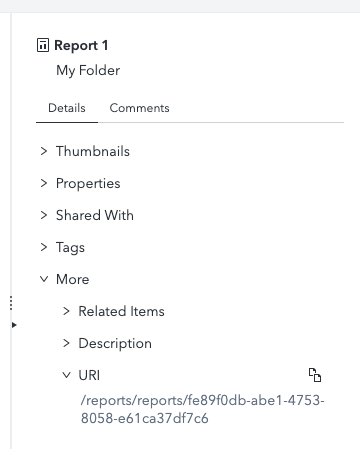
You can find the URI for a Folder or content item in SAS Drive in the Information Pane. Select the Folder or item, scroll down in the Information Pane to the More -> URI section and copy the URI.
See our examples
Our examples demonstrate a few different ways to start using the SAS Content SDK in your HTML application.